










how-to
How to Set Ball Position for Every Club
Ball position isn't a single spot you set once and reuse for every club in the

Most golfers who own a launch monitor can tell you, after the fact, whether they've hit a draw or a fade. The path number went in-to-out, the face was closed to the path, the ball moved right-to-left. They've got the diagnostic side dialed in. What they haven't figured out yet is how to produce a specific shape before they hit the shot.
That's the gap this article closes. Once you understand the face-to-path relationship as a controllable input rather than just a diagnostic read, shaping a shot on demand stops being guesswork. You're not hoping the ball moves. You're engineering the conditions that make it move, and you're using the data to confirm it worked.
The numbers your launch monitor shows for club path and face angle aren't just diagnostic. They're the variables you're directly adjusting when you try to shape a shot.
TrackMan's published educational article "What is Face-to-Path?" (TrackMan Blog, September 23, 2024) explains the relationship precisely: face-to-path is the difference between your face angle and your club path at impact, and it's the primary determinant of shot curvature. A negative face-to-path value (face closed relative to path) produces a draw. A positive value (face open relative to path) produces a fade. The greater the difference, the more the ball curves.
TrackMan's data puts numbers to this: a driver face-to-path of -2 degrees produces approximately 19 yards (17m) of leftward curve. A face-to-path of +5 degrees produces roughly 44 yards (40m) of rightward curve. The curvature scales with the gap between the two numbers.
The critical point, and one that catches most mid-handicap golfers off guard, is that face-to-path isn't measured relative to your target line. It's the relationship between the face and the path only. You can have an in-to-out path, a face that's open to your target, and still produce a draw, as long as the face is closed relative to the path. The club path and face angle guide covers how to read these numbers diagnostically; this article starts from there.
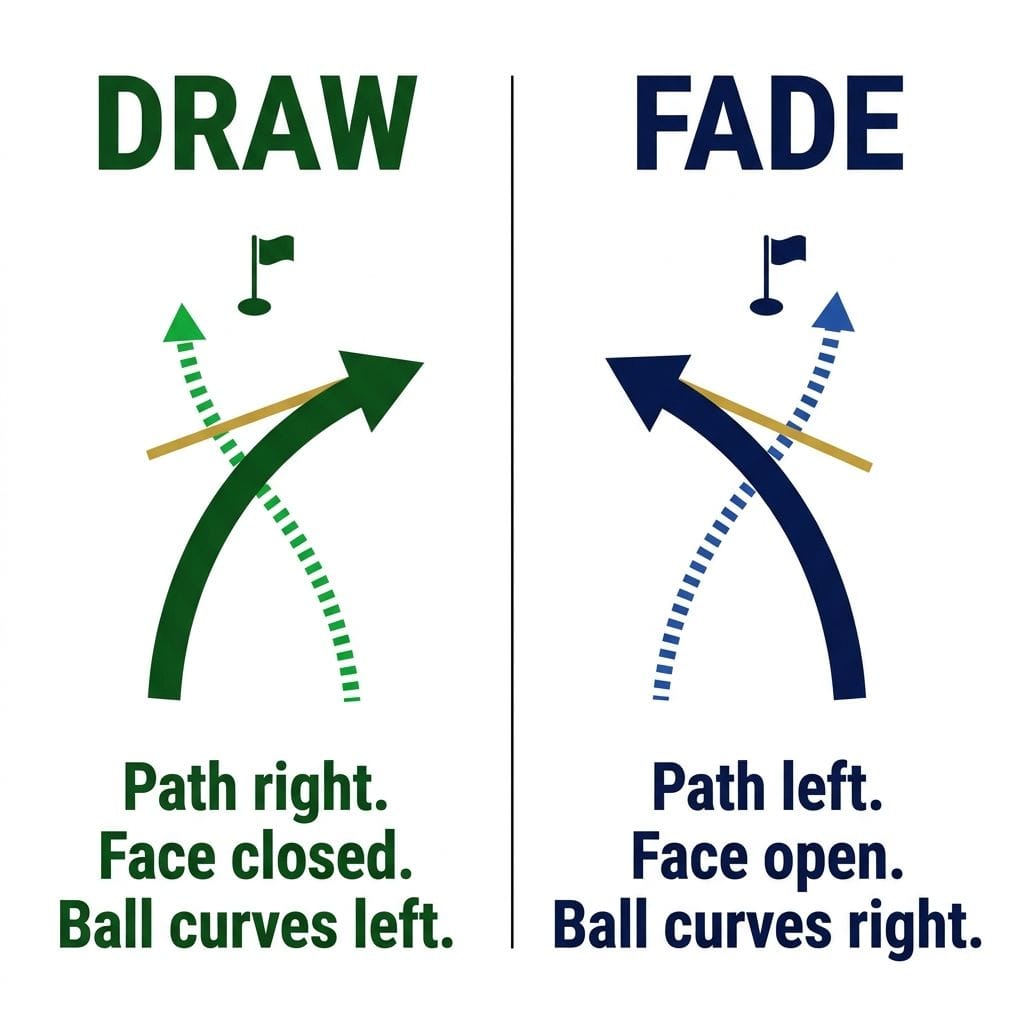
A draw requires the face to be closed relative to your club path at impact: a face-to-path reading of -2° to -3° in the irons is a workable target for a controlled draw that curves without losing significant distance.
Setup
Align your feet, hips, and shoulders slightly right of your target (for a right-handed golfer). Aim the face at the actual target. When you swing along your foot line (an in-to-out path relative to the target), the face will naturally be closed to the path while pointing near the target. The ball starts where the face is pointing and curves away from the path: right-to-left.
What the launch monitor should show
If your face-to-path is reading 0 or positive, you haven't produced a draw regardless of where the ball appeared to go. If your path is deep in-to-out but your face-to-path is near 0, the face has opened to compensate, a common error covered in the mistakes section below.
The drill
GOLF Teacher to Watch Todd Casabella describes a string drill published at golf.com (January 26, 2024): place an alignment stick or length of string on the ground as your target line. Position the ball a foot or two (30 to 60cm) in front of it. For a draw, your job is to swing to the right of the string while pointing the clubface at the top of the string at impact. Casabella's coaching cue: "right path and a face pointing to the left of the path." The string gives you an external reference for both the path (your swing tracks to the right of it) and the face (it stays aimed at the end of the string, not the right). Hit five shots, check your face-to-path on the monitor. If the number is negative and consistent, you've got the pattern.
A fade requires the face to be open relative to your club path: a face-to-path reading of +2° to +3° in the irons produces a controlled left-to-right curve for a right-handed golfer.
Setup
Align your feet, hips, and shoulders slightly left of your target. Aim the face at the actual target. When you swing along your foot line (an out-to-in path relative to the target), the face sits open to the path while pointing near the target. Ball starts at the target and fades right.
What the launch monitor should show
The drill
Casabella's string drill in reverse. Same setup, opposite execution: swing to the left of the string while keeping the face pointed at the top of it. Casabella's cue: "left path and a clubface pointing to the right of the path." If your face-to-path is reading positive and consistent across five shots, the fade pattern is there.
A note on the fade specifically: it's genuinely the easier shape to trust under pressure, because it's easier to keep the face open through impact than to close it reliably. Many mid-handicap golfers who've been trying to learn a draw actually produce better results committing to a consistent fade; worth knowing before you decide which shape to program.
Five shots confirms the pattern exists. Ten consecutive shots in the target face-to-path range confirms you own it.
After each set of 10 shots, check three numbers: face-to-path (is it consistently in your target range?), spin axis (is it consistently in the expected direction?), and shot shape on the monitor's shot trace (does the curve match your intention?). All three should align. A session where your face-to-path is right but your spin axis is inconsistent means contact quality is interfering with the pattern. Thin shots and heel strikes change the spin axis regardless of the face-to-path number.
A shape is usable on the course when you can produce it on demand with a face-to-path reading within 1 degree of your target for at least seven out of 10 shots. Below that threshold, treat it as a work in progress rather than a shot you can commit to under pressure.
Don't go straight from the range to the course. Build the shape in a studio or with a net first, then take it to a range where you can see ball flight and confirm the curve matches the data, then take it to the course in a low-stakes round. That three-stage progression matters.
Adjusting path without moving face. This is the most common error. A golfer who sets up to swing in-to-out for a draw but lets the face stay square to the path will produce a straight push, not a draw. Closing the path alone isn't enough; the face must also be closed relative to the path. Check your face-to-path, not just your path.
Using grip strength changes to control face angle. A strong grip (rotated right for a right-hander) closes the face relative to the target, but if it also closes the face relative to the path, you haven't changed face-to-path; you've just changed the overall aim. Grip adjustment is a long-term swing change, not a shape-programming tool. Set up with the face and path first.
Overdoing the path. A path of +10° in-to-out for a draw is too much. At that depth, the face typically opens during the downswing to compensate, driving face-to-path back toward zero and producing a block or a push-draw that starts too far right. Keep path changes moderate: +3° to +6° in-to-out for a draw, -3° to -6° out-to-in for a fade, and let the setup create the differential rather than the swing effort.
Use a draw when: the safest miss is left, the hole curves right-to-left, or you need maximum carry distance. A draw launches slightly lower with less spin than a fade for most mid-handicap golfers, which typically adds a few yards to carry.
Use a fade when: the safest miss is right, the hole curves left-to-right, or you need a shot that stops quickly after landing. A fade lands softer. It's also the shape to default to when you need to play the percentages and control matters more than distance.
Play straight when: you don't have the shape dialed in yet for that club and that situation. A committed straight shot beats a half-hearted attempt at a shape that isn't ready for the course. Take your medicine.
A practical rule: program your draw and your fade in practice, pick whichever suits the hole, and only reach for it when you've confirmed it's in the bag. Shaping shots you haven't practiced with a monitor adds errors, not control.
The face-to-path principle is the same for every club, but the magnitudes shift. The same -3° face-to-path that produces a gentle draw with a seven-iron (7-iron) will produce a bigger curve with a driver, because driver shots have less loft and therefore less backspin to counteract the sidespin. Start programming shapes with irons; once the pattern is consistent, move to the driver and expect the curve to amplify until you dial back the face-to-path differential.
Check the spin axis on your launch monitor. A genuine draw shows a negative spin axis (tilted left for a right-hander); a genuine fade shows a positive spin axis. A mishit that happens to curve the same way will usually show an inconsistent spin axis alongside poor smash factor. If your face-to-path is in the right range and your spin axis is consistent, the shape is real. If they don't align, the ball flight isn't a shape you programmed.
Loft is the key variable. Higher-lofted clubs produce more backspin relative to sidespin, which reduces the visible curve. A 50° gap wedge with a -3° face-to-path will show much less curve than a driver with the same face-to-path. This is expected and not a problem for most approach-shot situations, where you want a controlled curve, not a dramatic one. If you want visible shape on short irons, you'd need to increase the face-to-path differential, which typically makes the shot harder to control.
Both club path and face angle need to be in the data set for this to work. Two solid options:
For a full monitor comparison, see the complete consumer launch monitor guide.
Some links in this article are affiliate links. If you buy through them, I earn a small commission at no extra cost to you. This never influences what I cover or recommend. I link to gear I'd buy myself.
Data-backed reviews and advice that works. No brand spin.