
Strokes Gained Explained: What Every Golfer Needs to Know (and How to Start Using It)
Strokes gained shows where you're losing shots. The formula, the 4 categories, and why 100,000+ amateur rounds say approach matters most.

Strokes gained measures how each shot you hit compares to the average performance from that same position. Columbia professor Mark Broadie built the framework and published it in Every Shot Counts (2014), replacing the old "fairways hit and putts per round" box score with something that tells you where you're losing shots. For most amateurs, the answer isn't where they think it is.

Quick Picks
- The framework measures every shot against a statistical baseline, not your score at the end. It tells you where shots are leaking, not how many.
- The formula is simple: Starting Position Value minus Finishing Position Value minus 1 equals Strokes Gained. Positive means you gained on the field; negative means you lost.
- There are four categories: Tee, Approach, Around the Green, and Putting. Most amateurs lose the most strokes on approach shots, not putting (Shot Scope, 100,000+ rounds).
- You don't need a tour-level setup. Arccos, Shot Scope, Golfissimo's free calculator, or even your home simulator can get you started.
- Three to five rounds of data reveals reliable trends. Don't overreact to a single round. Collect a small sample, find the pattern, then aim your practice there.
The Formula in Plain English
Broadie's formula works like this: every position on a golf course has a statistical value based on how many strokes it takes, on average, to hole out from there. A drive that lands 150 yards (137m) from the pin in the fairway has a different value than one that ends up 150 yards (137m) out in the rough. The formula compares where you started, where you finished, and what you "spent" to get there.
Strokes Gained = Starting Position Value - Finishing Position Value - 1
The "minus 1" accounts for the stroke you played. If the average player would take 3.8 strokes to hole out from your starting position, and your shot leaves you in a spot where the average player would take 2.5 strokes, you gained 0.3 strokes on that single shot (3.8 - 2.5 - 1 = 0.3). You beat the average by 0.3 strokes.
Strokes gained is a golf analytics framework that assigns a numerical value to every shot based on the expected number of strokes needed to hole out from that position. Positive means you outperformed the baseline on that shot. Negative means you fell behind.
The baseline changes depending on what you're comparing against. PGA Tour strokes gained compares against other tour pros. The amateur tools listed below compare against golfers of similar handicap, which is more useful if you're a 15-handicapper trying to figure out whether your wedge play or your putting deserves more range time.
The Four Categories
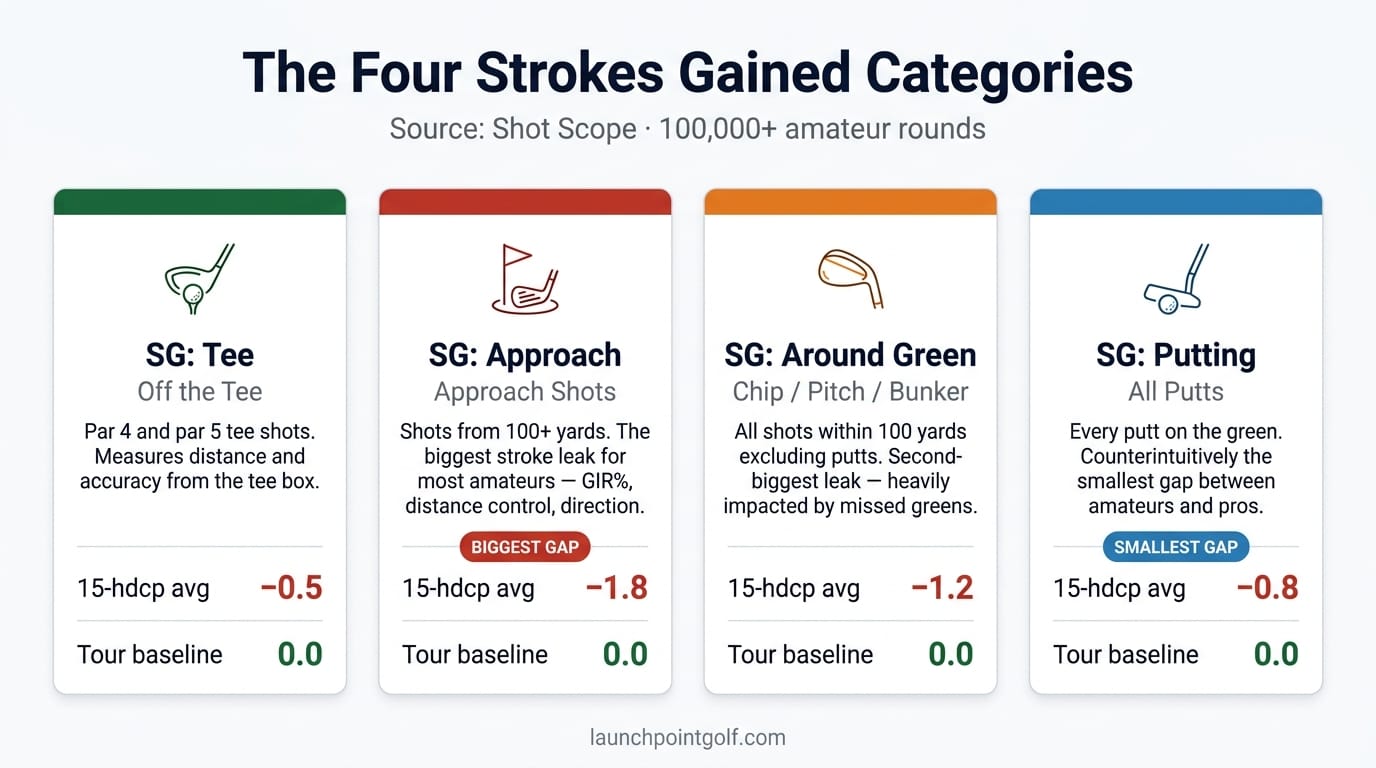
Strokes gained splits the game into four areas, each isolating a different part of your round.
Strokes Gained: Tee (Off the Tee)
This covers every tee shot on par 4s and par 5s. It measures how much distance and accuracy you're generating compared to the baseline. A long, straight drive gains strokes. A short drive that stays in the fairway might break even. A big miss into the trees loses them.
For most mid-handicappers, tee shots land somewhere in the middle: not the biggest strength, not the biggest leak.
Strokes Gained: Approach
Approach shots are anything played from over 100 yards (91m) when you're not on the tee of a par 4 or par 5. This is the category where amateurs haemorrhage the most strokes. Shot Scope's dataset of over 100,000 amateur rounds shows that a 15-handicapper on average loses more strokes on approach than in any other category.
Why? Because approach shots combine two hard things: distance control and directional accuracy from 120 to 200 yards (110 to 183m). At that range, a five-yard (4.6m) distance miss or a three-degree face angle error translates into a 30-foot (9.1m) position difference on the green, which is the difference between a makeable birdie putt and a scramble for par. Tour pros hit greens in regulation around 65% of the time. A 15-handicap player, according to Shot Scope's data, hits closer to 30-35%. That gap shows up in strokes gained: approach more than anywhere else, and it compounds: every missed green creates a short-game shot that wouldn't have existed with a better approach.
Strokes Gained: Around the Green
Chips, pitches, bunker shots, and anything played from within 100 yards (91m) that isn't a putt. Shot Scope's data shows this is the second-biggest leak for most amateurs. The difference between a chip to three feet (0.9m) and a chunk that stays in the rough is massive in strokes gained terms. And you're facing these shots far more often than you'd like, because you're missing greens on approach.
Strokes Gained: Putting
Here's the counterintuitive part. Putting is the category where the difference between amateurs and better players is the smallest. Shot Scope's amateur data shows putting accounts for a smaller share of strokes lost for most mid-handicappers.
That doesn't mean putting doesn't matter. It means the gap between a 5-handicapper and a 15-handicapper on the greens is much smaller than the gap in their approach play. Yet most amateurs spend the majority of their practice time on the putting green. The data says flip that priority.
Why Most Amateurs Are Practising the Wrong Thing
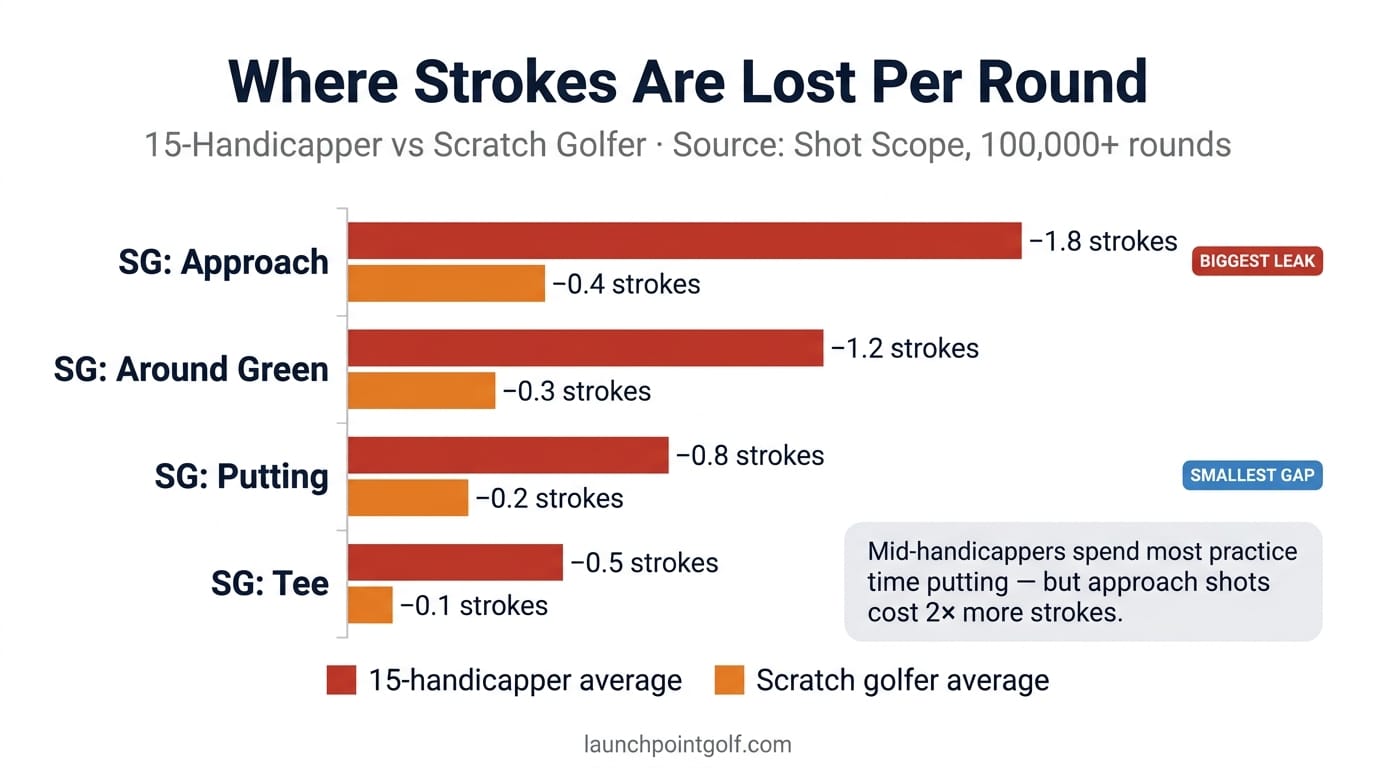
Shot Scope's data across 100,000+ rounds tells a clear story: the average mid-handicapper loses the most strokes on approach shots and around the green. Putting ranks last.
If you spend 60% of your practice time on the putting green and 10% on approach shots, you're investing your time where the returns are smallest. That's like pouring your budget into the department that's already performing well. Think of it this way: if you've got a 45-minute range session, and 30 of those minutes go to putting, you're left with 15 minutes split between irons and chipping. Flip that. Spend 25 of those minutes hitting 7-irons and wedges from 100-175 yards (91-160m), 10 minutes on chipping, and 10 on putting. The strokes gained data says that reallocation will produce faster improvement than any amount of lag putt practice.
The fix isn't complicated. Once you've got your own strokes gained data, you can see your personal breakdown. Maybe putting is your weakest category. Some golfers lose more strokes on the greens. But you won't know until you've got the data, and the averages point to your approach play deserving more attention than it's getting.
Strokes gained data from Shot Scope's 100,000+ rounds shows approach shots are where mid-handicappers lose the most ground. Not putting, and not the tee. That's where course management decisions have the highest leverage: choosing the right target, playing the right shot shape, and leaving yourself in the right position on the green. When your approach accuracy sits at 30-35% GIR, every target selection error costs more than a missed four-footer.
How to Start Collecting Your Own Data
You don't need expensive equipment. Several tools make strokes gained accessible for regular golfers.
Arccos is the most hands-off option. Their sensors attach to your grips and auto-track every shot via GPS. The app calculates strokes gained across all four categories after each round. It's a set-and-forget system, and the data builds over time without you doing anything extra on the course.
Shot Scope combines a GPS watch with automatic shot tracking. Their strokes gained dashboard is solid, and their massive amateur database means you're comparing against golfers like you, not against tour pros. The V5 watch tracks shots automatically through club sensors.
Garmin Approach watches (the S70 and S62 in particular) provide shot tracking with strokes gained insights through the Garmin Golf app. If you already wear a Garmin, this is the lowest-friction entry point.
Golfissimo offers a free online strokes gained calculator. You enter your shot data manually after a round. It's more work, but it costs nothing and gives you a solid starting point if you want to see what strokes gained looks like before committing to a tracking device.
One round gives you a rough picture. But don't make big practice decisions based on it. Three to five rounds will show reliable trends, according to analysis from Golfissimo and Pinpoint Golf. Single-round variance is real: you might three-putt four times one day and never do it again for a month. The pattern across several rounds is what matters.
| Tool | Tracking | SG Categories | Hardware Cost | Subscription | Best For |
|---|---|---|---|---|---|
| Arccos Caddie | Auto (grip sensors + GPS app) | All 4 | ~$230 USD / ~£185 / ~AU$360 | $8/mo or $80/yr | Set-and-forget tracking |
| Shot Scope V5 | Auto (GPS watch + club tags) | All 4 | ~$200 USD / ~£160 / ~AU$315 | None (one-time) | Value + deep amateur data |
| Garmin Approach | Auto (GPS watch) | Partial (Tee + Approach) | $350–500 USD / £280 / ~AU$550–790 | None (Garmin Golf app free) | Existing Garmin users |
| Golfissimo | Manual entry after round | All 4 | Free (no hardware) | Free | Try before you buy |

Arccos Caddie
Shot Scope V5

Garmin Approach

Golfissimo
How Simulator Data Maps to Strokes Gained
If you've got a home simulator, you're already sitting on approach shot data most golfers don't have.
GSPro and some E6 Connect modes capture shot-by-shot data including carry distance, dispersion, and shot shape. That maps to strokes gained: approach. Every iron session on your simulator is a chance to measure whether your 7-iron from 160 yards (146m) is landing closer to target over time. What does that mean in practice? Track your dispersion pattern at a specific yardage across five sessions. If your 150-yard (137m) 7-iron scatter is a 40-foot (12.2m) circle in session one and a 28-foot (8.5m) circle by session five, you've tightened your approach dispersion by 30%. That improvement maps to strokes gained: approach because tighter dispersion means more greens hit, shorter first putts, and fewer scramble situations. The mechanism is straightforward: the strokes gained baseline assumes average dispersion at each distance, so beating that average on the simulator translates to beating it on the course.
Most strokes gained guides skip this angle. They talk about on-course tracking, but your simulator gives you a controlled environment to grind the specific category where you're losing the most strokes. If approach is your biggest leak (and for most amateurs, it will be), your simulator is the best tool you've got to close that gap.
The Garmin R50 is a strong mid-range unit for this kind of strokes gained practice. If you're weighing simulator software, our GSPro vs E6 Connect vs TGC comparison breaks down which platforms capture the most useful shot data.
One caveat: launch monitors under $1,000 (AU$1,550) focus on ball speed and carry distance. They're useful for approach practice but won't give you the full strokes gained picture. For that, you'll want on-course tracking from Arccos or Shot Scope alongside your simulator work. GPS watches from PlayBetter's golf GPS range bridge both worlds: course tracking during rounds and pairing with your practice data at home.
What to Do With the Numbers: A 3-Step Framework
Data without a plan is numbers on a screen.
Step 1: Identify Your Biggest Leak
After three to five rounds of tracked data, look at which category shows the most negative strokes gained number. That's your priority. Not the category you enjoy practising. Not the one you think is weakest. The one the data says is costing you the most shots.
For most golfers in the 10-22 handicap range, this will be approach or around the green. If yours is different, trust the numbers.
Step 2: Allocate Practice Time by the Data
Flip your practice split to match where you're losing strokes. If approach is your worst category and putting is your best, a 50/30/20 split (approach/short game/putting) makes more sense than equal time across all three.
A solid pre-round warm-up that targets your weak category beats 30 minutes of random range balls. If your strokes gained: around the green is bleeding, spend 15 minutes on pitch shots from 40-70 yards (37-64m) before your round.
Step 3: Track Progress Over 10-Round Windows
Strokes gained shifts over time. Don't check after every round expecting transformation. Compare your numbers in 10-round rolling windows. If your strokes gained: approach moves from -2.5 to -1.8 over 10 rounds, that's real progress: two to three shots per round coming from better iron play alone.
Every 10 rounds, pull up your dashboard (Arccos and Shot Scope both make this easy) and see whether the numbers are moving. If they're not, reassess your practice plan.
Frequently Asked Questions
Do I need expensive equipment to use strokes gained?
No. Golfissimo offers a free online calculator where you enter your shot data manually after a round. It takes about 10 minutes per round and gives you a full strokes gained breakdown. If you want automatic tracking, Arccos (sensors on your grips) and Shot Scope (GPS watch with club tags) are the most popular options, costing between $150 and $300 USD (approximately £120-£240 / AU$235-AU$470) for the hardware. You can also get useful partial data from Garmin Approach watches if you already own one.
How many rounds do I need before strokes gained data is reliable?
One round gives you a rough snapshot, but don't make practice decisions based on it. Three to five rounds shows reliable trends across the four categories, according to analysis from Golfissimo and Pinpoint Golf. Ten rounds or more gives you a solid statistical picture. The key is consistency: track every round, not the good ones. Cherry-picking rounds defeats the purpose of the data.
Why does strokes gained say my putting is fine when I feel like I putt terribly?
Because the gap between good and average putting is smaller than you think. Shot Scope's data from 100,000+ amateur rounds shows that putting is the smallest contributor to the strokes-gained gap between handicap levels. A 15-handicapper and a 5-handicapper might differ by 0.5 strokes per round on the greens, but by 3 or more strokes on approach shots. You notice three-putts because they're visible and frustrating. You don't notice that your 7-iron from 155 yards (142m) lands 35 feet (10.7m) from the pin on average instead of 20 feet (6.1m), but that gap costs you more over 18 holes.
Can I use my home simulator to improve my strokes gained numbers?
Yes, for strokes gained: approach in particular. Simulator software like GSPro and E6 Connect captures carry distance, dispersion, and shot shape on every swing. If your on-course strokes gained data shows approach is your biggest leak, your simulator gives you a controlled environment to grind iron accuracy without the time cost of going to the range. Track your dispersion at key yardages (100, 125, 150, 175 yards / 91, 114, 137, 160m) and watch it tighten over weeks. That will translate to better approach numbers on the course.
Is strokes gained useful for beginners or only low-handicap golfers?
It's useful at every level, but the payoff is biggest for golfers in the 10-22 handicap range. That's where the data reveals the largest mismatch between where strokes are lost and where practice time is spent. If you're a 25+ handicapper, your data will likely show losses everywhere, which is less actionable. Focus on getting your swing functional first. Once you're breaking 95 with regularity, strokes gained becomes a powerful tool for targeting what to work on next.
Your Next Move
Pull up your last five rounds and figure out where you're bleeding strokes. If you don't have tracking data yet, play your next three rounds with Shot Scope, Arccos, or even a manual scorecard you feed into Golfissimo's calculator. Then look at the numbers. Odds are strong that your approach play is costing you more than your putting, and that single insight is worth the effort of tracking alone.
The golfers who improve fastest aren't the ones who practise the most. They're the ones who practise the right things. Strokes gained is how you figure out what "the right things" are.
Some links in this article are affiliate links. If you buy through them, I earn a small commission at no extra cost to you. This never influences what I recommend. I link to gear I'd buy myself.

Get the best golf content, weekly
Join thousands of golfers who get our latest reviews, swing tips, and course guides delivered every week. No spam, ever.